

OCR Issues Authentication Guidance
November 7, 2016
Over the past years, the healthcare sector has been one of the biggest targets of cybercrime. Some of these cybercrimes resulted in breaches due to weak authentication, which has made healthcare entities take a second look at their safeguards and consider strengthening their authentication methods.
Authentication is a process used to verify whether someone or something is who or what it purports to be in the electronic context, while keeping unauthorized people or programs from gaining access to information. In the healthcare sector, healthcare entities usually use login passwords or passphrases to access information on public or private networks, internet portals, computers, medical devices, servers, and software applications. Authentication is based on specific criteria, including:
- Something you know (i.e., passwords, passphrases);
- Something you are (i.e., fingerprint, signature, voiceprint, or retina or iris pattern);
- Something you have (i.e., smart card, token).
The Person or Entity Authentication standard of the HIPAA Security Rule requires that covered entities and business associates implement reasonable and appropriate authentication procedures to verify that a person or entity seeking access to electronic protected health information (ePHI) is the one claimed.
Covered Entities and Business Associates should:
Conduct an enterprise-wide Security Risk Analysis that is accurate, comprehensive, and thorough. By conducting a risk analysis that identifies vulnerabilities to the ePHI in their enterprises, they can identify the vulnerabilities of their current authentication methods and practices, the threats that can exploit the weaknesses, the likelihood of a breach occurring, and how a particular type of breach (if it occurs) can impact their business and mission. This process helps entities rate the level of the risk and determine (based on their risk analysis): if the risk should be mitigated with a particular type of authentication; if they should keep the current authentication method in place and accept the risk; if they should transfer the risk by outsourcing authentication services to a business associate; or if they should avoid the risk altogether by eliminating the service or process associated with a particular authentication risk.
Consider, based on the probability of potential risks and vulnerabilities to their ePHI, implementing a form of authentication that is reasonable and appropriate for their size, complexity, and capabilities, and their technical infrastructure, hardware, and software security capabilities.
Consider different recommended methods of authentication, depending on the results of their risk analyses, including:
Single-factor authentication – A process that uses one of the three factors (i.e. something you know, are, or have) to attain authentication. For example, password is something you know and is the only factor that would be required to authenticate a person or program. This would be considered a single factor authentication.
Multi-factor authentication – A method that uses two or more factors to succeed authentication. For instance, a private key on a smart card that is activated by a person’s fingerprint is considered a multi-factor token. The smart card is something you have, and something you are (the fingerprint) is necessary to activate the token (private key).
Editor’s note:
The takeaway here is that you must be using unique user ID’s/logins (no generic logins), must be able to log or “track” that ID’s/logins access in a manner that allows you to tell which of those ID’s/logins accessed what ePHI at any given time. You may use an authentication method that is less complex if you are a smaller Practice. You may not share user ID’s/logins or the passwords
New Guidance on HIPAA
And the FTC Act
Does your organization collect and share consumer health information? When it comes to privacy, you’ve probably thought about the Health Insurance Portability and Accountability Act (HIPAA). But did you know that you also need to comply with the Federal Trade Commission (FTC) Act? This means if you share health information, it’s not enough to simply consider the HIPAA Privacy Rule. You also must make sure your disclosure statements are not deceptive under the FTC Act.
Find the new guidance at:
2009 HITECH Changed the Regulatory Environment for Business Associates
Healthcare-focused IT companies that access electronic protected health information (ePHI) during their normal course of supporting a Covered Entity have been hit especially hard by the HITECH Act. Such companies, defined as business associates (BAs), are now directly liable under HIPAA rules and could be subjected to civil and criminal penalties for failing to meet new standards.
This is a significant departure from pre-HITECH HIPAA, when all responsibility and liability fell on Covered Entities (health care providers, health plans, and clearinghouses). The change should come as no surprise: almost two-thirds of historical data breaches involved a Business Associate.
The penalty for violations of a single provision can reach up to $1.5 million, and fines can add up if an organization has multiple infractions.
Is your IT Vendor HIPAA compliant?
Your Vendor should be able to easily and quickly provide:
- A copy of their most recent (within 1 year) Security Risk Analysis
- A copy of their HIPAA Policies and Procedures
- Copies of their employees HIPAA Training certificates (within 1 year)
If they cannot do this, they are not HIPAA compliant and each time they login to your network, you have a reportable breach of ePHI.
There are a LOT of IT firms who are ignoring these rules. At a September HIPAA meeting in Washington, DC, Jocelyn Samuels, Director of the HHS Office for Civil Rights, stated that if your Business Associate fails an audit, YOU fail the audit.
Frankenstein approach to cybersecurity renders healthcare organizations dead last at fixing vulnerabilities
By Jessica Davis HealthcareIT News
The biggest problem? Outdated IT and tight budgets make it hard to fend off growing throngs of hackers
Not only does the healthcare industry have the highest occurrence of cybersecurity mishaps of all industries, it also ranks at the bottom for its ability to fix software vulnerabilities and a big part of the problem is credential, identity and access management, according to security specialists.
Significant vulnerabilities lie within credential management, cryptographic issues, information leakage, code quality and insufficient input validation, security firm Veracode noted in its seventh annual State of Software Security report, which also determined the aforementioned ranking of healthcare as last among industries.
As safety of patient data under HIPAA is a major healthcare industry concern and more organizations are held accountable for HIPAA compliance violations, flaws within the cryptographic arena and credential management demonstrate the need for better security in these areas.
“If you look at the health sector and the executives and managers: They’re not equipped in this day and age to prevent threats,” ICIT Researcher James Scott said. “Board members and executives within the healthcare industry don’t care enough about cyber hygiene because it doesn’t have a solid return on investment.”
Adding to the issue, Scott explained, is that healthcare has applied ‘Frankenstein’ techniques to its IT programs, stitching together outdated technology that was never meant to be networked.
“The health sector is one of those critical infrastructure silos, but they flat out refuse to adapt to the imminent threats,” Scott said. While the financial sector completely overhauled its systems after the most prominent attacks, like Target, healthcare has yet to make that priority shift.
“Once an attacker knows that a system exists and that it can be remotely accessed, they compromise it by leveraging an exploit against a discovered vulnerability,” according to the ICIT report. “If a seller can gain rudimentary access to a network, then they can laterally move to systems that contain valuable information.”
Editor’s note:
If you are in the healthcare field, either as a Covered Entity (Doctor’s Office) or as a Business Associate (IT Company) you MUST take any and all reasonable steps to protect ePHI. There are no other choices. You have to protect the Patient’s data. That means updating technology such as firewalls and endpoint antivirus software. That means encrypting portable devices that travel from office to office. That means staff training on how to detect phishing emails that are trying to deliver ransomware payloads. You may have gotten by for along time not paying much attention to IT and network security. With every machine connected to the Internet these days, you simply cannot do that any longer. Failure to do so puts your Practice and the Physician Owner’s livelihood at risk. That is not a long-term plan for success.
New Stuff We Are Doing
We are putting the final touches on a new program that will allow us to send phishing emails to your staff, see who opens them, report back to you who your “clickers” are, and then send them to an educational class about phishing emails.
Let us know if you have an interest in this program as an addition to your ongoing HIPAA Staff training.
Also, if you need a HIPAA Security Risk Analysis performed, give us a call to talk about it. We are Certified HIPAA Security Professionals (CHSP) and can get you on the right road with your compliance program.
Hank Wagner, President
hank.wagner@computernetworksinc.com
757-333-3299 x232
Ransomware
This is the biggest threat healthcare faces today. Ransomware is software that gets installed on your network and encrypts all of your files, including your Patient records, then demands a payment to the criminal to decrypt all of your data.
I don’t understand: Unless you have blocked them using a Content Filter, your staff is on the Internet all day long. They are going places that are not business related, they are logging into their Yahoo and Gmail checking personal email. They are shopping for shoes and clothes and at this time of year, Christmas presents. They are checking Facebook, Pinterest, and Instagram, while streaming live music off of Spotify. None of this activity is business related. Not to mention that they are doing this on YOUR time, using YOUR bandwidth. Allowing this to continue is a dangerous proposition.
Eventually, one of these folks is going to do one of two things:
- Go to a website that has been hacked
- Open a phishing email that has a “payload” containing malicious software
When either of these things happens, the malicious software tries to download and install itself on your network. If your IT company is staying up with the times, they have a UTM (Unified Threat Management) firewall running Antivirus, Content Filtering and Intrusion Prevention software which blocks the malicious software and reports on it.
If not, then the malicious software downloads and installs itself. It then begins encrypting your files. Encryption modifies the files so that only people with a decryption “key” can unlock those files.
This goes on in the background unnoticed by most folks until they are not able to open one of their programs. If you have network drives (a drive letter other than C:\) this software will encrypt those server drives as well. If it continues undetected, eventually you will get a notice on your screen asking for money to get the decrypt key from the crooks.
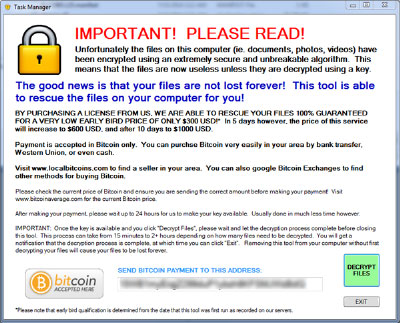
If you get a message similar to the one above, you are in deep trouble. You only have two options:
- Pay the crook and hope he gives you back the keys to unlock your files
- Restore your files from backups
Most folks in the industry do not believe in paying the ransom as it fosters the bad behavior even more.
In any event, The Office for Civil Rights (OCR) has issued guidance that this constitutes a Data Breach and is reportable to OCR. Because the files had to be accessed in order for the crook to encrypt them, the crook’s access is considered a breach of all your records and reportable to OCR within 60 days. Requiring a notice to all your Patients via mail. Requiring a notice to all your Patients on your web site. Giving Patients a loss of confidence in your Practice. I am pretty sure that this is not something you or your Physician want.
HIPAA compliance requires a backup and a backup plan. Make sure you are doing both!